Most “AI for SEO” workflows still come down to the same three steps: export a CSV from Search Console, drop it into a chat window, and hope the model adds the numbers up correctly. It often does not. A 16-month export does not fit in a context window, and a model handed exactly 1,000 rows has no way of knowing whether that was all of them or the first page.
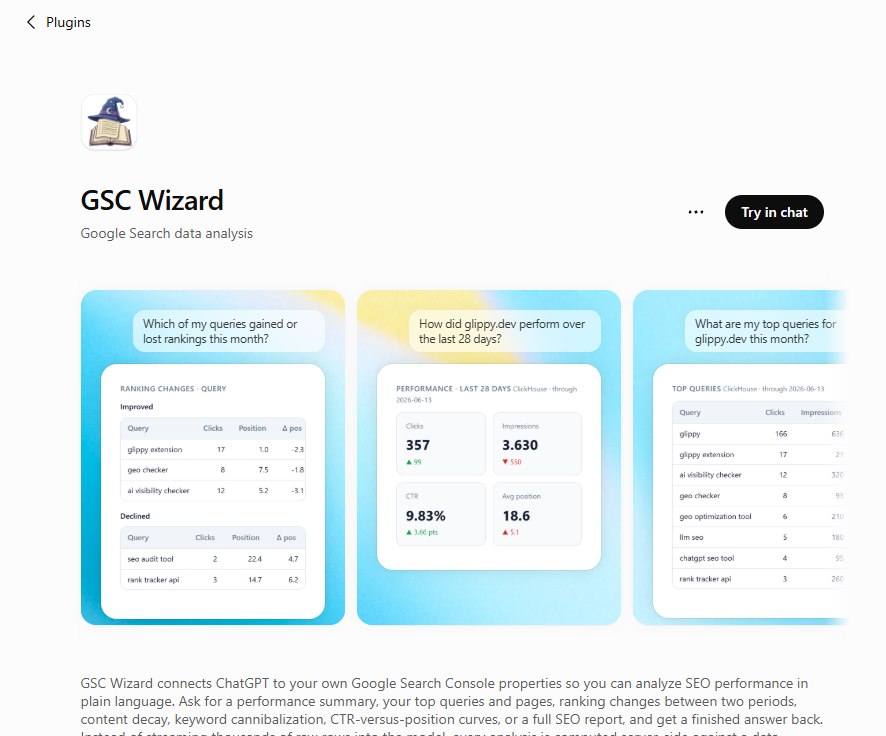
So I removed the export step. GSC Wizard is now available as an app inside ChatGPT: chatgpt.com/plugins/gsc-wizard
What you can ask
You sign in with Google, and the app reads only the properties already connected to your account. From there you type what you would otherwise click together in a dashboard:
- “Give me a performance summary for example.com”
- “Which queries gained or lost rankings versus last month?”
- “Find pages that are decaying”
- “Where am I cannibalizing keywords?”
- “Show my CTR versus position curve”
- “Inspect https://example.com/pricing in Google”
- “Generate a full SEO report”
Behind that are more than a hundred tools: search analytics, ranking changes, anomaly and change-point detection, forecasting, opportunity scoring, URL inspection and bulk inspection, IndexNow submissions, content groups and topic clusters. Bing Webmaster Tools and GA4 are covered too, so “how did this page do in Google, Bing and conversions” is one question instead of three exports.
Why this beats pasting a CSV
Every analysis is computed server-side against the warehouse that already holds your daily GSC data. ChatGPT never sees the raw rows; it gets a finished result, usually a few dozen rows, rendered as an interactive card or table.
That matters for three reasons. Speed: an aggregate over millions of rows returns in about a second. Accuracy: the numbers come out of a SQL aggregation, not out of a language model doing arithmetic on a wall of text. Context: a full report costs a fraction of the tokens, so the conversation stays usable afterwards. Where a tool does cap its output, it says so explicitly and tells the model how to fetch the next page, which is the part silent truncation gets wrong.
Setting it up
Open the app, sign in with Google, ask your question. It needs a GSC Wizard account with Search Console connected, and new accounts start on a trial. Access is scoped to your own account, and you can revoke it whenever you like.
Not a ChatGPT user? The same server speaks MCP, so Claude, Gemini, Grok and anything else that talks MCP can connect to mcp.gscwizard.com and get identical answers.
If you try it, I would like to hear which questions it answers well and which ones it fumbles. That feedback is what shapes the next set of tools.